

Candidate Forum Guide

This guide provides the framework and advice for running a candidate forum. Freedom for Faith staff will support you every step of the process.
If you have any questions, or want to know more about hosting a forum, contact us at [email protected]
Planning schedule
More than 3 months before election
-
- Invite other churches to collaborate
- Identify potential venue(s)
- Set a date and time
- Build relationship with sitting MP:
- Invite to a church event
- Discuss candidate forum and dates
Once the sitting MP has accepted the invitation, the event is confirmed and planning can proceed.
The venue can shift any time before the forum is promoted, if a better location is identified.
3 months before election
- Confirm venue
- Promote forum to your members and surrounding churches
- Invite other candidates as they arise
- Send confirmation of event to candidates. Include promotional material for their information.
2 months before election
- Finalise run-sheet (see run-sheet section)
- Allocate roles (see advice section)
- Confirm logistics (sound, live-stream etc)
- Confirm set questions (see questions section)
- Provide set questions and run-sheet to candidates, confirm their attendance.
1 month before election
- Hold forum (best held 3-4 weeks before election, just before pre-poll opens)
- Send note of thanks to candidates
After election
- Send congratulatory note to winning candidate. Suggest a meeting in the next 3 months.
Target audience
The purpose of the candidate forums is to create a venue where politicians can meet the Christians of their electorate, hear our concerns, and give a response.
The event is most effective when it is focused on the Christian community, rather than trying to be a general community “town hall”. In a wider community event, it is hard to keep a focus on the specific concerns of the Christian community, and they can be drowned out.
Collaborate with other churches
These events are most effective when they are clearly from a range of churches, not just one. Churches are more likely to promote and be supportive if they have been involved in the conversation early.
Early in the process, we suggest you connect with like-minded churches in the electorate and invite them to be part of the planning.
While there are a few jobs that need to be filled for the forums to run well, there are multiple opportunities that can be taken up by representatives of your partner churches to demonstrate the breadth of engagement of all the churches.
Set a Venue
You may wish to host at your church, or there might be a more appropriate venue who you want to collaborate with. Some factors to consider:
- Accessibility and parking. God willing, there should be quite a few people from a range of churches coming to the event.
- Livestreaming facilities are very important; they include people who cannot attend due to time or distance, and they provide a permanent record of the candidates’ comments and commitments. This promotes accountability. If livestreaming is unavailable, then a recording is a second-best option.
- We do not suggest providing supper or coffee; just hold a simple meeting.
Christian schools can be a great venue for a forum. However, it is important that the churches are still “hosting” the event. Freedom for Faith can help in contacting school networks for approval.
The venue can change any time before promotion. It is fine to set an initial venue that you are certain of, in order to lock in the date and time, and then shift to a better location if one is found.
Set a Date and Time
Date
There is no perfect time for the forums. Make sure it is before pre-polling starts, and try avoid things like public holidays where many families will be away.
The Victorian election is scheduled for November 28 2026, with prepoll likely opening November 16.
The best window for a Victorian forum is the first two weeks of November 2026.
Time
Your knowledge of your community will determine the day and time. Usually, we suggest an evening on Monday-Thursday, starting at 7 or 7:30. In some electorates, including regional areas, a weekend afternoon or evening might be more appropriate.
Notify FFF of the date and time, so we can start creating promotional materials.
Inviting Candidates
Once a venue and date are set, it is time to invite candidates.
The first candidate to invite is the sitting MP (assuming they are running for re-election). If you know the election date (i.e. most state elections) the MP can be locked in very early, so send the invitation as soon as you have a date and time confirmed.
FFF is maintaining a database of candidates and their contact details, and will discuss with churches and denominations the best candidates to invite for each electorate. We will provide churches with their contact details and suggested invitation text. All you need to do is cut and paste the email and send it to the provided address. FFF can help you, but it is better coming from the church than straight from FFF. A sample email is included below.
When you hear a response, let us know and we will keep track of responses in our data system.
Any candidates who have not responded in a few days will be followed up by email (again, FFF provides the details and text) and a phone call. FFF can call on the church’s behalf and do that chasing.
Once the sitting MP has accepted the invitation, the forum is confirmed.
You can start inviting other candidates as they are known, and promoting the event.
Promotion
Once a venue and date are set, FFF will create promotional materials that you can use in your church, and send to all the churches in the electorate. The materials provided will include a PowerPoint slide, flyer and newsletter text.
At the same time, FFF will coordinate with denominations to send emails to all the churches in the electorate telling them that these events are being planned and encouraging them to participate.
All forums will be listed on the MeetYourCandidates website, so people can find their closest event.
You do not need to use the provided materials, feel free to create your own. If designing your own slide, just be mindful of colours. Use your church’s colour palette, but try to avoid looking like you are using the colours of any one political party exclusively (ie, avoid all blue, or all red).
Plan run-sheet and allocate roles
A suggested run sheet is in the structure section of this guide, with more detailed advice in the advice section.
There are only a few essential roles to run the night. One person can fill all the up-front roles, or they can be spread across representatives of multiple churches.
- Open the evening and pray, possibly with a 5 min devotion
- MC who will introduce the candidates and manage the question process (could be multiple people)
- Someone to manage and moderate the question process; if using the Slido app, monitor questions for appropriateness and flag the next question to ask for the MC (see Slido section).
- Time keeper(could be MC or Slido moderator)
- Logistics: opening building, running sound and livestream.
A valuable, but not essential, role is greeting and looking after each candidate. If a minister from each church is allocated a candidate, they can greet them at the door, ensure they find their seat, and build a relationship with them. If the forum is held in a Christian school, this role could be filed by the school prefects.
Suggested Event Run-sheet
Each section has more detailed comments in the Event Tips section.
Introduction
- Welcome
- Thank candidates
- Access to toilets etc
- Gospel introduction
- Pray
Candidate Introductions
- Explanation of who has been invited
- Introduce Slido for questions (Keep Slido slide up when videos not playing)
- Comment on time keeping
- Invite each candidate to give an introductory speech (3 min each)
Announcements
- Announce attendees in person (for live stream and candidates)
- Announce number of attendees on live stream
- Remind about Slido
- Play introductory video (if provided)
Set questions
Explain process
- Time keeping for answers
- Holding candidates to answer
- Alternating who answers first
Questions
- Play video (if using videos) or ask the question
- Ask candidates for 2 minute answer
Questions from the floor via Slido
- 2 minute answers.
Conclusion
- Thank candidates
- Pray
General Advice
Tone
The tone of the event is very important. These candidate forums are intended to be positive experiences for all candidates. The purpose is for them to hear from us what issues are of concern to Christians, and for them to have a fair opportunity to express to us what their party policies are on the issues and what they are going to do.
The forums are not about telling Christians which parties are the best to vote for. Instead, the questions will allow the candidates to tell us where they stand on issues we care about, so that we can make a more informed choice. It may be that one party is strong on one issue and another strong on another, and it is up to each Christian to decide how they will weigh the relative importance of those issues when they cast their vote.
If politicians feel like the forums are pushing the audience to one side or the other, then they will either take us for granted or see us as hostile. Either way, they ignore our concerns. By demonstrating that Christians are a demographic that they need to work to win (and could win), we make our issues important to them.
Keep the tone of the forums polite, respectful, and non-partisan.
Dress
Most candidates will be in business casual or formal – ranging from jacket to suit or suit and tie. Each context is different, but we recommend something along the lines of a jacket, or what you would wear for preaching at a wedding.
Seating
There are two options for seating the candidates – on the “stage” or at the front row of the “audience”. Both have advantages and can be dependent on the building.
We recommend seating the candidates on the stage if the distance makes it too hard for them to get up and down quickly to answer (e.g. a school hall stage). If you have female candidates, please consider “skirt appropriate” seats.
If the candidates are seated on the stage, you can either have a single microphone that they walk up to, or they can remain seated and each have a microphone. Having a single microphone that they pass to eachother can work, but can be also be clunky.
If the candidates are seated on the front row, ensure you have a clear and quick path up to the microphone.
Candidate introduction
Before introducing the candidates, it is important to explain which candidates have been invited and why. Many events have chosen to only invite two or three candidates, based on who is likely to win the seat. In that situation the MC could say something like:
We have not invited every candidate standing for the election. In order to keep time short, and to hear as much from the major candidates as possible, we decided to only invite candidates from the major parties who are seeking to form government, or other candidates with a strong chance of winning the seat.
Slido
Early in the event, and at appropriate moments through it, say that you will be taking questions through Slido and put the slide up. People with questions can log in and submit their question.
We are using Slido to manage our questions. At any time in the night, as you think of a question, go to slido.com and type in the number on the screen. You can ask your own questions, or click the thumbs up to vote for another question.
We will leave this slide up all night so you can log in any time you need to.
If you are using an alternative to Slido for non phone users, mention that too.
Welcome
Apart from the mechanics of the night, the introduction is a great gospel opportunity. There is likely to be members of the community not strongly connected to your churches either in the building or on the live stream. We recommend you take a couple of minutes to explain why a church is hosting an event, and how this event comes out of our wider gospel mission. Possible themes include:
- Jesus wants all people to come to him and be saved, and you can find out more by asking minister or coming to church!
- God made the world and loves all people and wants the best for them, this includes good government
- Jesus is King, and has delegated authority to governments (Rom 13). We are called to be subject to government, and governments are called to rule justly and wisely
- Christians care about our neighbours as other people created in the image of God
Announcements
After the introductions, once there has been a chance to count the people in the room and the live stream audience has settled down, announce both sets of numbers. This helps the candidates and the audience get a picture of how many people are involved.
If for some reason the numbers are not very high, you might skip this step.
It’s also worth highlighting Slido again at this point, as you move into the set questions.
Time keeping
It is important to have a clear process for time keeping. At the start of the event, explain that you will keep candidates to time, and then make sure that you do.
Set the length of each answer ahead of time and keep to it. Shorter answers tend to be better than longer, and candidates are used to getting their answer across succinctly. The difference between 2 minutes answers and 3 minute is not much in terms of content, as they will mostly take longer to say the same thing. However, In a forum with 4 candidates, it means 16 minutes saved over the first 4 questions – allowing another question or two.
A bell or other sound is an excellent way of keeping to time. Ring a bell 30 seconds before the time is up, and again at the end of time.
More subtle forms of time keeping (like a subtle noise, hand gesture, standing near the candidate, etc) might seem morep polite, but can often be ignored by a more assertive candidate who considers their point more important than keeping to time. It may seem like it is not nice to cut a candidate off, but letting them go on will upset other candidates, or encourage them to go longer. It is better to be clear and firm.
You may want to allocate time keeping to a different person than the MC.
Speaking order
It is usually best to alternate the speaking order for fairness. Speaking first all the time can look like the candidate is the most important one, but speaking later can give a candidate the opportunity to directly comment on what previous candidates have said about the issue.
If you are changing the speaking order for each question, make sure that you explain the proces to the candidates and the audience.
Also make sure that you are keeping track of who is speaking next to avoid confusion.
One method is to have a list of the speakers (or have them sitting in an order) and have them speak in that order, but cycle through who goes first each time.
Set Questions
When introducing this section, it is helpful to explain how it will work. Some points worth explaining are:
- These questions have been developed by the heads of major denominations
- You will be timing the candidates and will tell them when it has been 3 minutes, and to wrap up.
- How the speaking order will work.
Questions may include a short video explaining the question, or a paragraph that you can read giving some background.
Some organisations who have developed questions may have posted physical material to the church. If that is the case, it is helpful to mention it along with the corresponding question.
If your event does not have videos, simply read out the context and the question, and then invite the first candidate to speak.
It will be helpful to have the question on paper in front of you, or on the powerpoint (slides will be provided) so that candidates can refer to it easily.
Questions from the audience
We recommend using an online question management system like Slido. Freedom for Faith will provide you with a Slido account and login if your church does not have one.
For more details on using Slido and moderating questions, see the Slido section of this guide.
If you wish to provide an alternative to Slido, it is not recommended to resort to hands-up questions from the floor. In our experience these invite lengthy speeches and sometimes controversial statements and fringe questions.
An alternative would be to provide slips of paper that people can write their questions on and take to a nominated person, such as the AV person. That person could then type the questions into Slido for the MC to see.
Opening Set Questions
Senior leaders from a range of denominations are working to develop suggested initial questions.
When these questions are complete, they will be provided here, along with supplementary materials.
Slido is an online Q&A system that will allow participants to enter their questions, and the moderator can select which questions will be asked to the candidates. The advantage of Slido is that you can filter questions, see what questions have been voted as more important, and choose which question to ask the candidates next.
We have created a Slido account for you, and the login details will be emailed to you. However, if your church already has an account, then we recommend using that.
Before the event, take a few minutes to familiarise yourself with Slido. Log into the Q&A panel, and (on another device) ask a couple of test questions. Be sure you delete the test questions before the forum.
Question Process
- During the forum, audience members can submit questions through the audience page.
- The question moderator is logged into the Q&A Admin panel, and monitors the questions as they are submitted.
- As the time for questions from the floor aproaches, the moderator selects the first question to be asked and highlights it.
- The MC has a phone or tablet that is logged into the Q&A Admin panel.
- When it is time for questions, the MC can directly read out the highlighted question from their device.
- As the candidates give their answers, the question moderator selects the next question and highlights it.
- As the last answer is being given, the MC checks their device to familiarise themselves with the next highlighted question, then asks it.
- Repeat until time for questions is expired.
Q&A Panel
The Q&A panel is where the MC can see questions being asked by the audience and select the next question to ask the candidates.
Logging into the panel
Go to slido.com and click the “Log in” button on the top right corner. Use your church account, or the login details that we have sent to you.
There should be an event created for your forum (we’re using Ryde as our example)

Click on the event.
You may be taken to the “polls” page. We are not using polls, so we want to go to the “Q&A” page. You can find that on the menu.
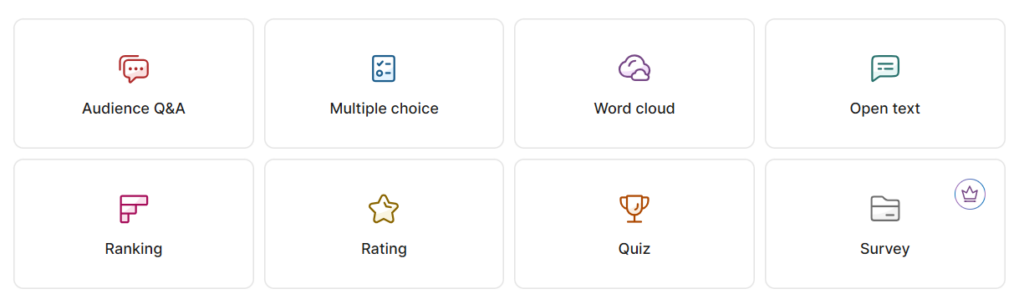
This will bring you to the screen that shows questions as they are asked.
Q&A Panel

As the audience asks questions, they will appear on the Q&A panel
On each question you will see the name of the asker (or anonymous if they did not provide one) and the question.
Each question will have a green “up” arrow, and a “tick” (on a laptop you might have to hover over the question for those buttons to appear)

- When planning to ask a question next, click on the green up button to highlight it and pin it to the top.
- When the question is answered, click the tick to mark it answered and remove it from the list (a question erroneously marked as “answered” can be found in the “archive” panel and restored).
- You can also find a pencil icon if you want to edit the question before marking it to be answered
Questions are sorted in order of votes, with the most popular at the top.
Audience Page
Audience members who want to ask questions can access the audience panel at slido.com by entering the unique code for your forum. We have provided that unique code in the email, and in the PowerPoint slide.

Once they have entered that code, they will see a panel similar to the MC’s panel, where they can ask their own questions and up-vote questions they agree with.
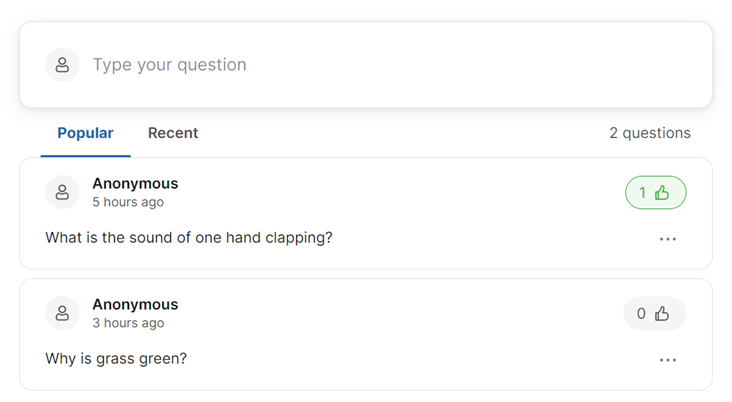
Moderating questions
Before the event, take a few minutes to familiarise yourself with Slido. Log into the Q&A panel, and (on another device) ask a couple of test questions. Be sure you delete the test questions before the night!
On the night, introduce Slido early and put up the PowerPoint slide we have provided you (or an alternative). You can keep that slide up for most of the night.
When the slide comes up, you can say something like:
“We are using Slido to manage our questions. Go to slido.com and type in the number on the screen. You can ask your own questions, or click the thumbs up to vote for another question”
Question Moderation
When selecting questions, we recommend making sure that the question can be asked fairly of all candidates. Avoid questions that target a specific party.
We strongly recommend having a person other than the MC monitoring the questions, and tagging the next question to be asked.
- The moderator also logs into the admin panel of Slido (we recommend using a PC/laptop rather than phone or tablet).
- the moderator reads the questions and tags the next question to be answered using the green up arrow button.
- The MC keeps the page open on their phone, and looks at the question tagged at the top of the list and asks it
- The moderator then ticks the question as answered and looks for the next question to tag.
Editing questions
We recommend that the moderator makes sure that the question is well written and easy to understand before marking it to be answered.
You can find the edit function by hovering over or clicking the three-dot button on the question and selectiong “edit”
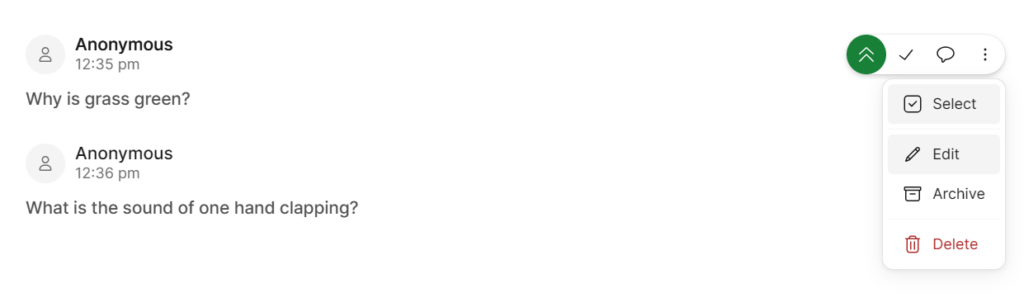
Creating questions
Alternatively, rather than editing an exisiting question, the moderator could create a new question. This is especially good if there are a number of questions in the same theme that need to be merged.
On a laptop, there is a “view as participant” button on the bottom of the page

This opens a panel on the side which allows the moderator to act as a participant and post a question.

Authorised by Mike Southon, Freedom for Faith, 168 Chalmers St, Surry Hills NSW